Backup MX Service for Email Continuity
Protect incoming email when your mail server is down. DNSExit queues messages, retries delivery, and can provide rescue mailbox access during outages.
Spool mail during outages
When your primary mail server is unreachable, DNSExit accepts inbound mail and keeps retrying delivery.
Rescue mailbox access
Enable rescue mode so users can read and reply through webmail or POP/IMAP while your server is offline.
Monitoring mode and spam control
Monitoring mode only accepts mail when your server is down, reducing unwanted secondary-MX spam attempts.
|
||||||||||||||
|
||||||||||||||
Email Backup & Rescue Highlights |
||||||||||||||
 |
||||||||||||||
Secondary Mail Exchanger
Monitor Primary MX: Greatly Reduce Spam
SPF, DKIM, Anti-Spam, Anti-Virus, Greylisting
Resuce as your Mail is Down
|
||||||||||||||
|
||||||||||||||
|
||||||||||||||
How to Signup
You can click here to sign up for mail back MX for your domain. You may be asked to create an account with us first.
| If you are already logged into the member account: | |
| A - domain using other name servers instead of our name servers: | |
| At the main menu of your account, there is a link for "Signup Services" and choose "Mail Backup MX service" to sign up. Since the domain is not using our name servers, you must add our mail server, smtp.dnsexit.com as the backup MX for your domain at the DNS server serving your domain. | |
| B - domain using DNSEXIT name servers: | |
| You must first set up DNS for the domain and specify the primary MX at "MX Settings" of the domain DNS. Then, click on the "Mail Backup Service" link at "MX Settings" to add Mail Backup MX Service to the domain. | |
|
|
|
Other Email Backup Features
 |
Optional monitoring mode: DNSExit checks your mail server every 8 minutes and accepts mail on your behalf only when your server is down. |
|
While in monitoring mode, you have the option to view your mail server uptime history. |
|
Monitoring mode can reduce spam reaching your server because many low-quality senders try secondary MX hosts first and do not retry properly. |
|
Filter queued mail with SpamAssassin before forwarding it to your server. |
|
Multiple backup servers receive your mail. The maximum message size is 60 MB. There is no limit on the number of queued messages or storage space for your domain. |
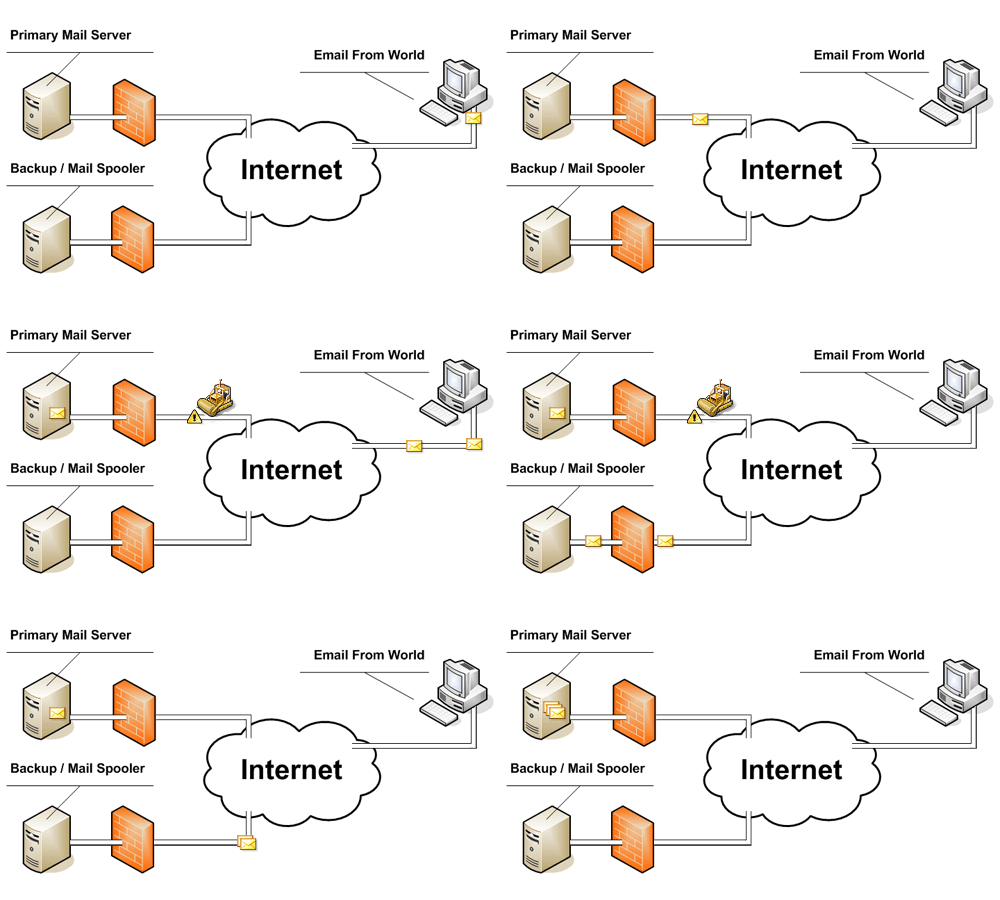
How email backup rescue works
 's mail backup service acts as
your second priority mail server. If your mail server cannot be reached,
the mail will be routed to our mail backup server and wait in queues. Our
server will keep checking your mail server every 20 minutes. Once your mail
server is detected as available, our mail server forwards queued messages to
your mail server. Delivery retries continue for 7 days, after which undelivered
messages are removed from the queue. You can enable spam checking so unwanted mail
is dropped before reaching your server. A web interface lets you check queued mail
and read messages even while your own mail server is down. You can also
return the service to monitoring mode, where DNSExit checks your mail server every
8 minutes and only accepts mail when your server is unavailable.
's mail backup service acts as
your second priority mail server. If your mail server cannot be reached,
the mail will be routed to our mail backup server and wait in queues. Our
server will keep checking your mail server every 20 minutes. Once your mail
server is detected as available, our mail server forwards queued messages to
your mail server. Delivery retries continue for 7 days, after which undelivered
messages are removed from the queue. You can enable spam checking so unwanted mail
is dropped before reaching your server. A web interface lets you check queued mail
and read messages even while your own mail server is down. You can also
return the service to monitoring mode, where DNSExit checks your mail server every
8 minutes and only accepts mail when your server is unavailable.
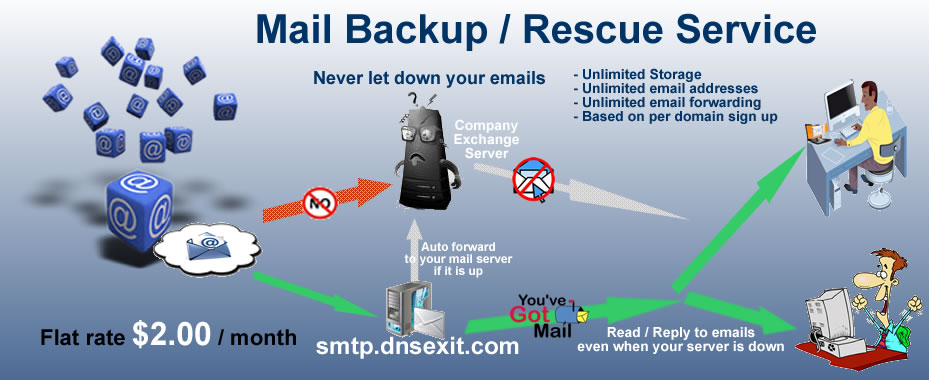
While your mail server is down, you can enable Mail Rescue Mode
so queued messages are rerouted to the rescue server. Users can read and reply from
rescue mailboxes, then send those messages back to your own server once it is available again.
SMTP Backup in Monitoring Mode
Monitoring mode keeps your primary mail server in charge while it is healthy. DNSExit watches the server and rejects secondary-MX deliveries until the primary becomes unavailable.
This reduces a common source of junk mail: poor senders often try secondary MX hosts first and fail to retry correctly when those hosts reject delivery. Legitimate mail should continue to use the primary MX while it is available.